Start with Ternair
Introduction
Menu
Audience Manager (data)
Campaign Manager (channels & content)
Key path
Automation
Execute
Schedule
Webhook
Time zones
Reports
Email dashboard
Campaign calendar
Email conversion dashboard
Manage
Home
Selections (classic)
Overview
Create
Manage
Search
Open
Lock
Template
Audience Manager
Campagne Manager
Runs
Schedules
Monitor
Campaign set
Operation Campaign
Search
To find the right selection faster, you can use different filtering options.
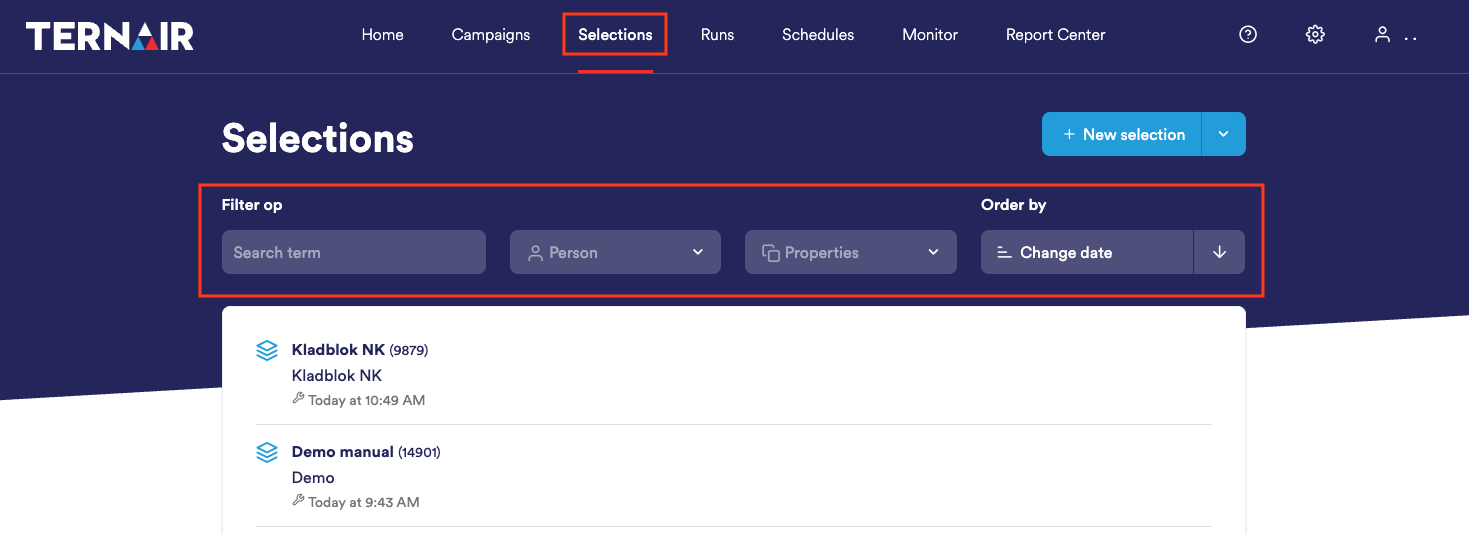
There are four ways to filter selections:
Search by keyword
Use the search bar at the top to search for a specific selection.Filtering on creator
You can filter by the person who created the selection. This is useful if you are looking for selections from a specific colleague.
Filter by properties
Under properties you can filter selections based on:Block types (e.g., email, datamart, export)
Last run on (period/date)
Last modified on (period/date)
Created on (period/date)
Sort by
You can also sort ascending or descending by:Last bovine date
Modification date
Selection ID
Select name